
You’ve seen the term everywhere: AI agents. Most explanations about what AI agents are go deep into developer tooling or lump every kind of AI activity into one scary “bots are taking over” headline. Neither one answers the question a marketer actually has: what is an AI agent, and does it change anything about how people discover my brand?
Here at Bitly, we’re in a good spot to help answer those questions. Our platform powers more than 100 billion clicks and scans a year across links and QR Codes, and every major AI platform fetches those links. Because Bitly links point to many different destinations across the web, we can observe how AI systems request content through those links and identify patterns across sites and platforms.
Here’s what our data shows. Compared to a year and a half ago, we now see 27 times as many agent-driven requests on Bitly links, but only 1.25 times as many crawler requests. So what does that mean? Requests triggered by a person’s question are growing far faster than routine crawling.
And while agent-driven requests make up only about 3% of the automated AI requests we measured, their growth is worth paying attention to. These requests come from AI assistants associated with user-directed tasks, although we can’t see the underlying prompts. Before we get into what it all means, let’s cover a few basics.
What is an AI agent?
An AI assistant is the tool you ask questions to, like ChatGPT, Claude, or Copilot. An AI agent is that same assistant at work: taking steps to complete a task on your behalf, such as searching the web, retrieving information from a page, comparing options, or using another tool.
Imagine asking an assistant to compare two products or find the current eligibility requirements for a government program. It may need information it doesn’t already have, so it searches for a relevant source and requests a specific link before answering you.
That request is known as agentic traffic: automated activity associated with a task someone asked an AI tool to perform. It doesn’t require a person to click the link themselves, but there is a person’s question behind the activity.
How is that different from a crawler?
A crawler also makes automated requests, but for a different purpose, and with no person behind it. Search engines and AI companies use crawlers to discover and collect information across the web on their own schedule. Nobody asked a question first, and a crawler might visit your content whether or not anyone is asking about it at that moment.
Agentic traffic starts the other way around: a person asks a question, and the AI tool makes a request while it works on that task. Think of the difference this way: a crawler gathers material a system might use later, while an AI agent seeks information for a task someone has in progress.
Both types of activity often get grouped under “bot traffic.” That makes it harder to tell whether a rise in requests reflects broad, automated collection or growing use of your content in response to people’s questions.
What we’re seeing behind the scenes
Bitly supports the creation of more than 2 billion links and QR Codes annually. Those links point to destinations like retail product pages and city service portals. When an automated system, such as a search engine’s crawler or an AI assistant working on someone’s question, requests a Bitly link, our redirect layer gives us a view into that activity.
Once we separate crawler requests from agent-driven ones, the destinations they request look different. Shopping and commerce was the largest destination category for both, but it accounted for about 22% of agent-driven requests, compared with about 46% of crawler requests.
Government and civic destinations showed a different pattern. Their share of agent-driven requests was 5.7 times their share of crawler requests. These destinations include official information about services, processes, and eligibility. And while we can’t see the question behind each request, the pattern is consistent with AI tools looking for specific information to help someone complete a practical task.
For marketers, the lesson is that the aggregate bot traffic number conceals behaviors that may call for different decisions about which automated systems can access your content and which requests are worth optimizing for.
What can agentic traffic tell you?
If an AI tool requests your short link, you know that it attempted to access that link and its content. Distinguishing these requests from routine crawling gives you another signal of AI activity on your links.
It is also a signal with limits. A request to a short link does not, by itself, tell you whether the AI tool cited your brand in its answer, recommended your product, or influenced what someone did next.
That’s why agentic traffic belongs alongside other measures of AI discovery:
- Crawler traffic shows how automated systems encounter your links
- Agentic traffic shows when AI tools request those links while carrying out tasks
- Answer visibility and citations show whether your brand or content appears in the response a person receives
- Human clicks and business outcomes show what happens when people choose to engage
Bitly reports agentic traffic on your links. Crawler traffic is filtered out of your analytics, so it won’t appear there. Each measure answers a different question. Looking at them together gives marketers a better view of how AI discovery connects to audience interest and, eventually, action.
Why does this matter now?
Agentic traffic still makes up a small share of the automated requests we see on Bitly links, but it’s growing fast enough to pay attention. For marketers, grouping all automated activity together could hide a shift in how AI tools find and use your content. It also affects how you decide who (or what) can access your content.
Most businesses control that with robots.txt or firewall rules, and those rules work by identifying the bot making the request. AI companies often list a separate identifier for each job: collecting content to train models, building a search index, and fetching a page when someone asks a question. So a rule that blocks one may leave the others untouched, and some requests made on a person’s behalf may not follow robots.txt at all. Before you change a rule, check each AI company’s latest documentation, then decide which of those you want to allow.
The right choice for your business depends on your goals. A publisher may want to protect licensed content. A government agency may want public guidance to be easy to find. A retailer may want to help shoppers compare products. Understanding what’s accessing your content, and why, gives you a better starting point for those decisions.
What should marketers do next?
You can start learning how AI tools interact with your brand by checking whether AI assistants are already visiting your links. If you use Bitly, there are two ways to see it:
- Across your account: Open Bitly Assist and ask, “How much AI traffic did my links get?” It estimates agentic traffic across all your links and tells you which links had any.
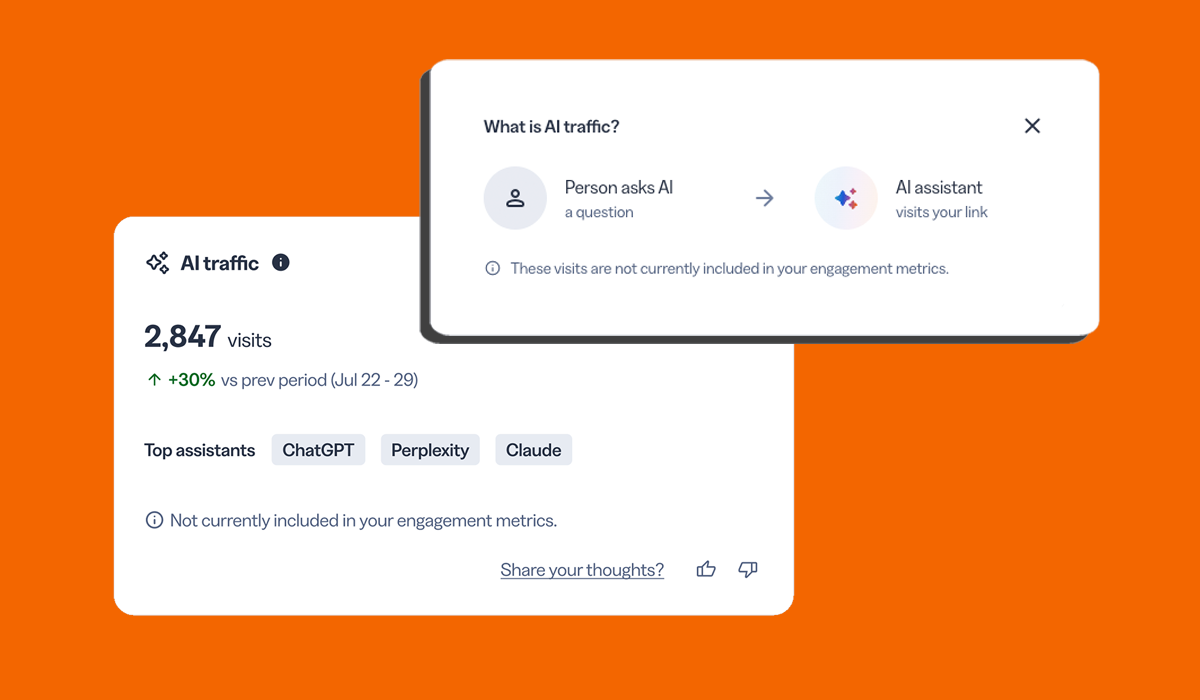
- For one link: Open the link’s details page, scroll to Link analytics, and find the AI traffic card.
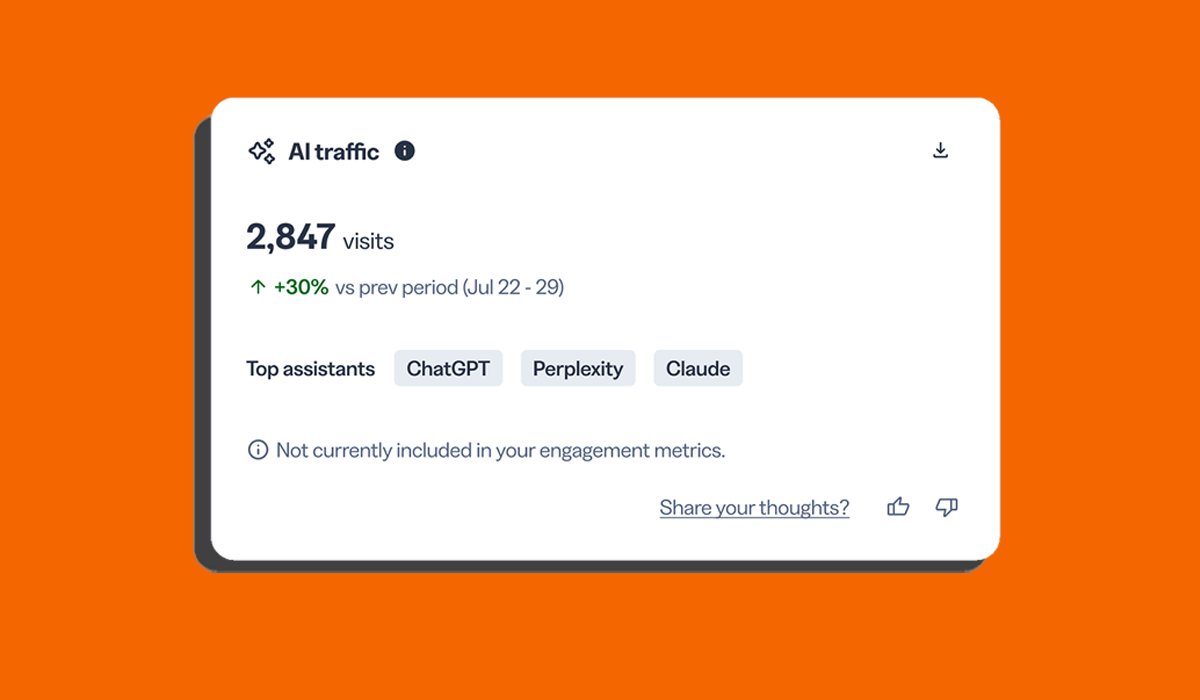
The card shows the estimated amount of agentic traffic in the date range you choose, how that compares with the previous period, and which assistants visited most, such as ChatGPT, Perplexity, and Claude. You can also download the data with a breakdown by assistant.
If you already track AI mentions and citations with an AI search visibility tool, agentic traffic adds another signal: whether AI assistants are visiting your links. Seeing which Bitly links receive agentic traffic can also help you prioritize updates to the pages they point to, helping keep the information AI assistants access about your brand accurate and current.
A clearer picture of AI discovery
For years, marketers have measured discovery largely through impressions, rankings, referrals, and clicks. AI adds activity between those familiar steps: a tool can seek information on someone’s behalf before that person ever reaches your site. Seeing that activity clearly is the first step toward understanding how the people behind those questions find your brand.
If you have a paid Bitly plan, open any link’s details page to see the estimated number of requests from AI assistants—and which assistants made them—separate from your human clicks.
Log in to your Bitly account today to see whether your links have agentic traffic.
Frequently asked questions
Is agent traffic the same as bot traffic?
Agent requests are automated, so they may be counted as bot traffic. But “bot traffic” also includes broad crawling and other automated activity. Separating those behaviors makes the data more useful.
Does an agent request mean my content appeared in an AI answer?
No. It shows that an AI tool requested a link. You need separate answer monitoring to see whether your content was cited or your brand was mentioned.
Will agent requests appear in my website analytics?
They may not appear as a distinct source, and a request to a short link does not necessarily produce a measured website session. Reporting depends on how the AI tool retrieves information and how your analytics handles automated traffic.
Should I block AI agents?
That depends on your content and business goals. Review the rules and identifiers for each provider before making a decision, particularly if you want to treat broad crawling differently from requests made while assisting a user.