
Bitly’s Model Context Protocol (MCP) Server takes everything you love about Bitly and puts it inside your favorite AI assistants and tools, like Claude, Cursor and VS Code. Create short links, generate QR Codes, and track performance—all through simple conversation. No need to switch from one application to another to copy and paste links or data.
This isn’t a pared-down version of Bitly; it’s the full power of our trusted Connections Platform, streamlined for the way you already work. For marketing teams, this means staying in your flow. Need campaign analytics while writing a brief? Just ask your AI for it and it’ll call the Bitly MCP Server for you. Want to create 20 branded links for a product launch? Done in one AI conversation.
Whether you’re planning a campaign, reporting on link clicks, or optimizing engagement, you can now create, track, and scale—all without leaving your chat. It’s faster, smarter, and built for the future of marketing.
What you can do in chat
With the Bitly MCP, your AI assistant becomes your digital marketing hub. Just tell it what you need in natural language, and it handles the rest. You can:
- Create bit.ly short links and branded short links with your custom domain, add titles and tags for easy organization, and even customize the ending of your URL.
- Generate custom QR Codes with your brand colors and logo, then download them ready for print or digital use.
- Pull real-time Bitly Analytics data on link performance, including clicks over time, top locations, and which channels are driving the most traffic.
- Update links by editing titles, tags, destinations, and archive status.
- Handle bulk tasks like creating dozens of links for a campaign, all with simple conversation.
When you ask your AI to shorten a link, it will seamlessly choose which of the available Bitly MCP tools to use on your behalf. The links will show up under your account as you’d expect, since you’ve used your account credentials at MCP setup. These tools cover link creation, analytics, QR Code management, and organizational controls, bringing Bitly’s most advanced features into your conversational workflow.
No need to write code, manually handle API documentation and responses, or mess around with HTTP requests; you can simply say, “Create a short link for this long URL and title it ‘Spring Launch’.” Your AI handles the work in the background.
Who it’s for
The Bitly MCP is designed for any Bitly user or team who wants the full Bitly platform integrated directly inside their AI workflow:
- Marketing and growth teams that live in AI assistants but still need professional campaign tools. Get faster reporting, track QR Code performance, and manage links without constantly switching tools.
- Developers and operations teams who want reliable, scalable connection management built into their workflows—whether they’re working in Claude, Cursor, or VS Code.
- Enterprise organizations that need governance, branded domains, and consistent campaigns across every channel, from LinkedIn posts to SMS communications.
Compatible AI assistants and platforms
The Bitly MCP works with popular AI assistants, including Claude, ChatGPT, Cursor, VS Code, and Windsurf.
If you just want to use Bitly with ChatGPT, we’ve also built a ChatGPT integration.
Getting started
Here’s how you can get started with the Bitly MCP:
- Log in to your Bitly account and navigate to Settings, then API.
- Enter your password and click the Generate token button. Keep it secure.
- Point your AI assistant to https://api‑ssl.bitly.com/v4/mcp and include your token in the header. Connecting your AI to the Bitly MCP Server depends on which AI assistant you are using. Please see our detailed MCP setup guide to find the instructions relevant to your AI tool of choice.
- Test the connection. Ask: “What Bitly tools are available?” Then try: “Shorten this URL” and include a link you want to try out. If everything is working correctly, you should see a short URL generated in your chat as well as in the Links section of your Bitly account.
Need detailed setup instructions? Check out our MCP documentation for step-by-step guides for how to get started.
Security, permissions, and rate limits
Your Bitly data stays secure in your account, with the same enterprise-grade protections you already rely on: API tokens for authentication and HTTPS encryption for link traffic. The MCP uses your existing permissions and plan limits—no additional access required.
The Bitly MCP in action
Try prompts like these right in your assistant:
- “Create short links for these 20 product URLs and tag them holiday-2025.”
- “Use our custom domain to shorten this long link, set the title to ‘Q4 Launch,’ add UTM parameters for email, and generate a QR Code for print.”
- “Which links got the most clicks this week? Show a ranked list and top referrers.”
- “Compare link analytics for our LinkedIn vs. SMS campaigns and flag anything with over 100 clicks for retargeting follow-up.”
From simple link creation to complex workflows, everything happens through natural conversation.
Let’s look at some real-world examples.
Link generation for a sales campaign
Here’s what a user asked:
“I’m launching a Black Friday sale campaign. Create a short link for https://shop.example.com/sales/black-friday-2025/abcdedg12345, title it Black Friday Sale 2025, tag it with BFCM, sale, and email-campaign, and generate a QR Code for print materials.”
Claude responded:
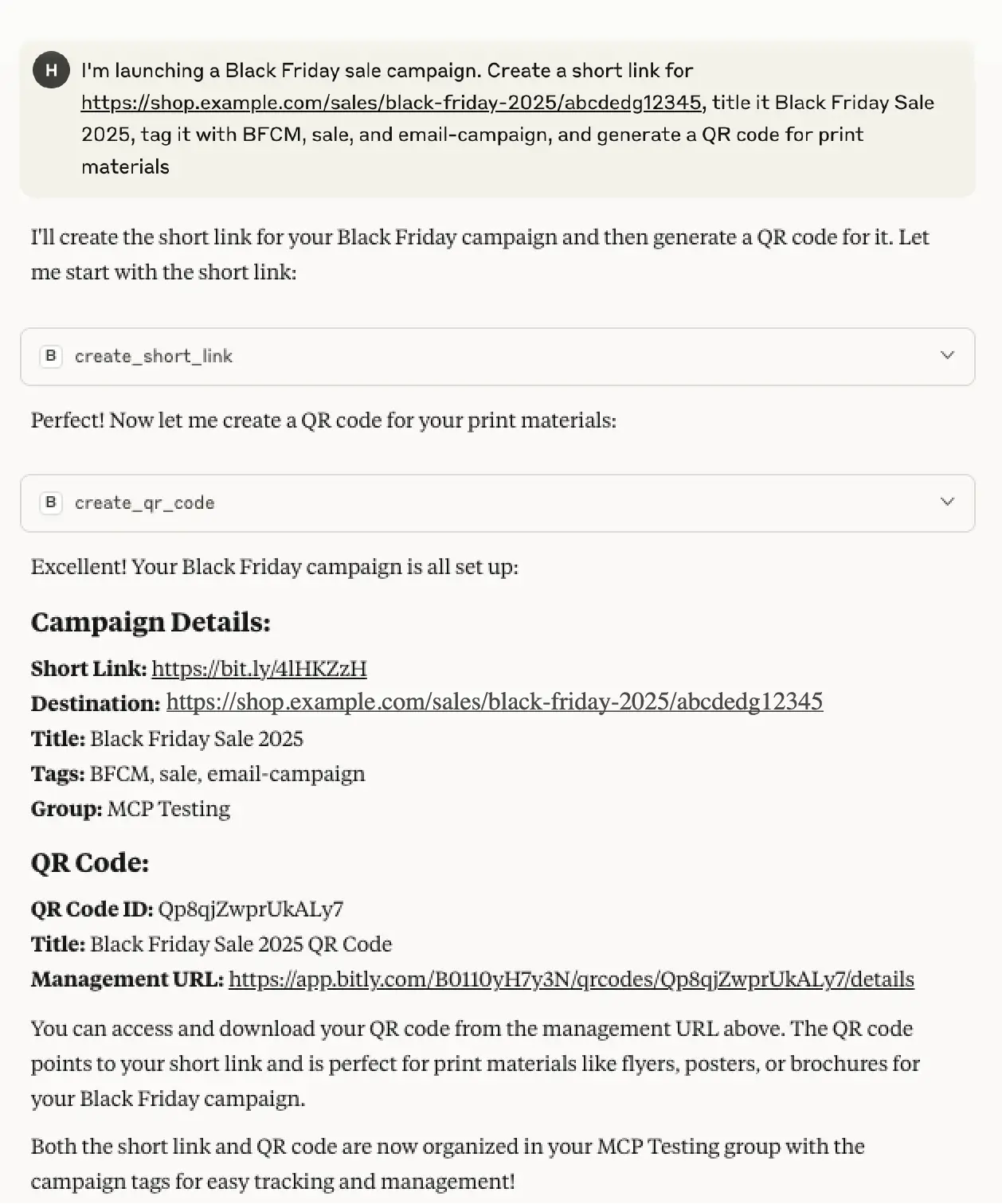
One prompt was enough to complete a multi-step Bitly workflow, saving your team time and letting them focus on what matters most—driving results and engaging customers.
Comparing the performance of marketing channels
Here’s another example showing how easy it is to get insights. This time, the user’s prompt was:
“Compare performance between our email and social media links.”
Claude responded:
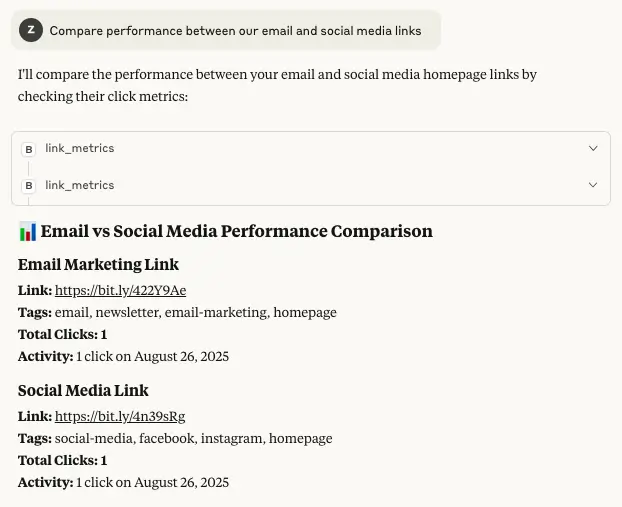
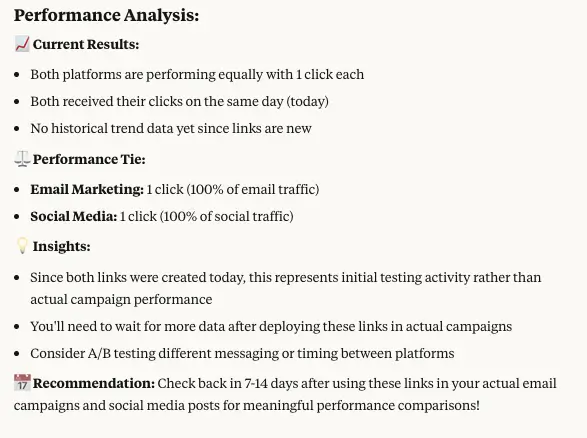
Claude automatically pulled the relevant data, compared performance across channels, and provided actionable insights—all formatted in an easy-to-read analysis.
Start creating, tracking, and optimizing without leaving your flow
You already plan, write, and review in AI. Now you can create, brand, track, and optimize with Bitly right where you work. Whether you’re scaling campaigns, running bulk operations, or just need a quick link for social media, the tools you trust are now a conversation away.
Bitly has always been about trusted, reliable link management. Now, we’re bringing that same reliability into AI workflows so you can move faster, measure more, and keep every customer interaction on-brand.
Co-authored with Raphael Syed, VP Engineering.
Ready to transform your workflow? Get started with Bitly today, connect your AI assistant, and see how seamless campaign management can be.





