

Driving online traffic is more complex than it used to be. Social platforms keep consumers scrolling, inboxes overflow with promotional noise, and organic traffic seems to slip further out of reach.
If you’re a marketer juggling limited time and budget, you need simple, reliable ways to drive potential customers to your site.
Branded short links can make a difference, lifting click-through rates(CTR) by making every URL recognizable, readable, and trustworthy, no matter where you share it.
When your links feature familiar domains and clear destinations, people feel confident tapping through. If it looks generic or cryptic, they hesitate. That small visual cue can make a big difference. If competitors use custom URLs and you don’t, their posts and emails may look safer and more credible than yours, so they get more of the clicks.
Traffic drops happen for many reasons, yet the gap between how links look and how people respond has become one of the most consistent points of friction. This guide brings together two things you need at the same time: a clear view of how traffic is shifting across major channels and a practical system you can use to protect the clicks you still earn—without expensive tools or complex analytics.
Key takeaways:
- Why this matters now: Traffic leakage at the moment between customers seeing a link and deciding whether to engage with it is rising; how your links appear (brand, readability, and consistency) materially changes CTR.
- What URL shortening unlocks: Trust (recognizable domain), clarity (clean, readable URLs), and measurability (channel-level insights without heavy analytics).
- Who this is for: U.S.-based businesses and lean teams that need pragmatic, scalable wins.
- What you’ll get: Context (state of traffic) → channel tactics (where shortening fits) → step-by-step plays you can accomplish in under an hour.
- Competitive edge: You can’t control the algorithms, but you can control the click. Branded links give you the upper hand.
The state of website traffic today
Traffic hasn’t disappeared—it’s just becoming more difficult to drive. The channels that once drove steady clicks now sit behind more barriers, and achieving the same results takes more strategy than before.
Our research backs it up: Among Bitly Free users, traffic (clicks/scans) dropped by 48% from January through September of 2025 compared with the same period in 2024. This reflects a broader shift in how often audiences choose to engage when links look generic or unfamiliar.
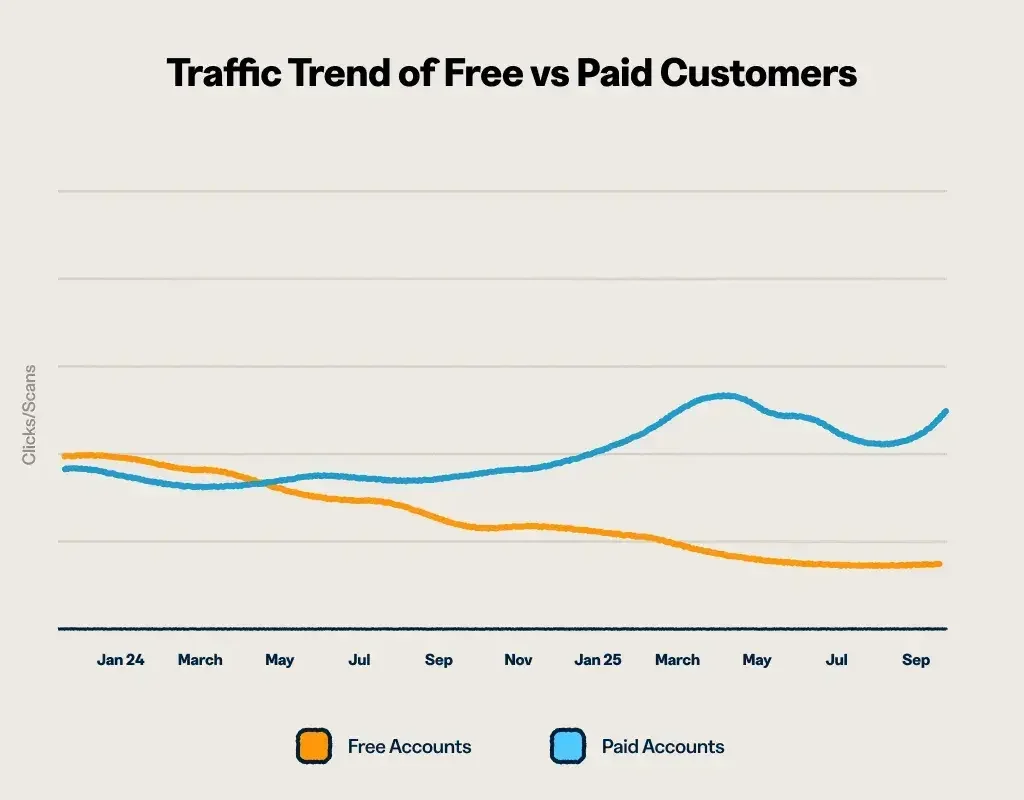
Paid Bitly users experienced a different pattern, with traffic growing by 88% from January through September of 2025 compared with the same period in 2024, showing that trustworthy links still have the power to drive traffic.
Why website traffic is harder to earn
Three major shifts have made it harder to drive clicks:
Why website traffic is harder to earn
Three major shifts have made it harder to drive clicks:
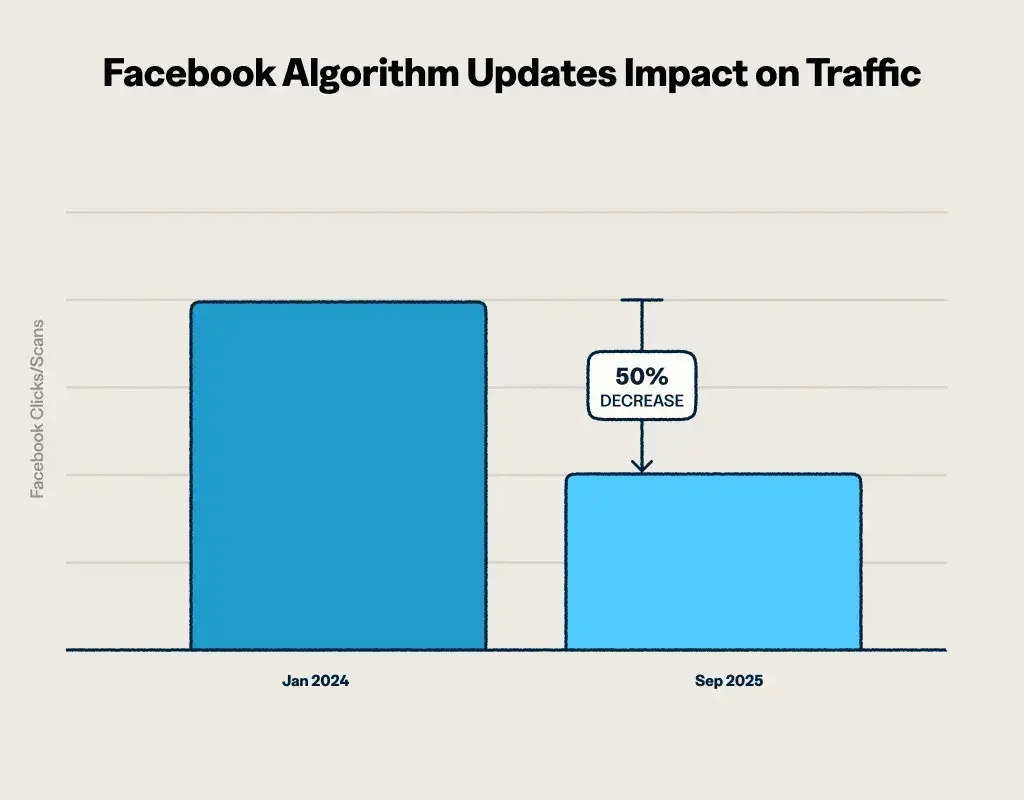
- Social media algorithms prioritize content that keeps users engaged within the app. Platforms like Instagram, Facebook, and TikTok limit reach for posts with external links, especially when the URLs look unfamiliar or unbranded. On Facebook alone, Bitly has seen outbound clicks from links fall significantly over the past few years, even as people keep using the platform.
- Email volume is increasing and AI summaries may be impacting engagement. The average person receives dozens of emails per day. Standing out means every element of your message has to pull its weight, including your links. Long, cluttered URLs can make a message feel spammy before someone even opens it.
And as more email clients begin to incorporate AI summaries into their inbox interfaces (like Gemini’s AI summaries in Gmail), some marketers may see slightly lower engagement. When customers see the highlights of the email’s content at the top of their screens, they may not feel compelled to click links in the email body. - Audiences are more cautious. After years of phishing scams, fake ads, and privacy concerns, people have learned to think twice before clicking. If your link doesn’t immediately look trustworthy and clear, most readers will scroll past it.
The rise of link optimization
Marketers spend hours perfecting their visuals and copy, but often overlook how their links look. Yet that small detail can make a surprising difference in trust and clicks.
Every link tells people something about your brand before they click. How it appears (the domain, structure, and overall readability) shapes how people perceive you and directly influences user clicks before they even land on your site.
The most important elements to optimize are:
- Your domain: A custom domain tells people exactly who the link comes from. Standard short links (like bit.ly/x7f9kyx) don’t display your brand name, so they don’t foster the same immediate trust or recognition.
- Your backhalf: The text after your branded domain should be clear and relevant. For instance, a fictional bakery might use go.bakery.com/spring-menu to instantly make it clear to customers that the link leads to their spring menu. However, a version like go.bakery.com/a8xK2p3 offers no useful context for the audience about what type of content the link leads to.
- Visual cleanliness: Short, simple URLs are easier to scan and process. Long strings of tracking parameters or random characters create friction in the user experience, even when the destination is safe.
When your links look clean and credible, consumers click more confidently.
What does this mean for marketers?
While web traffic may be harder to drive, the outlook is far from bleak. When we look at Bitly customers by company size, many continue to see an increase in their total clicks year over year:
- Businesses with 11–50 employees grew clicks by +81% YoY
- Businesses with 250–1,000 employees grew clicks by +109% YoY
Altogether, in the first three quarters of 2025, Bitly customers that are small to mid-sized businesses drove an average of 68% more traffic (clicks/scans) than in the previous year. These are often the teams using branded domains, consistent link naming, and a mix of channels beyond just social.
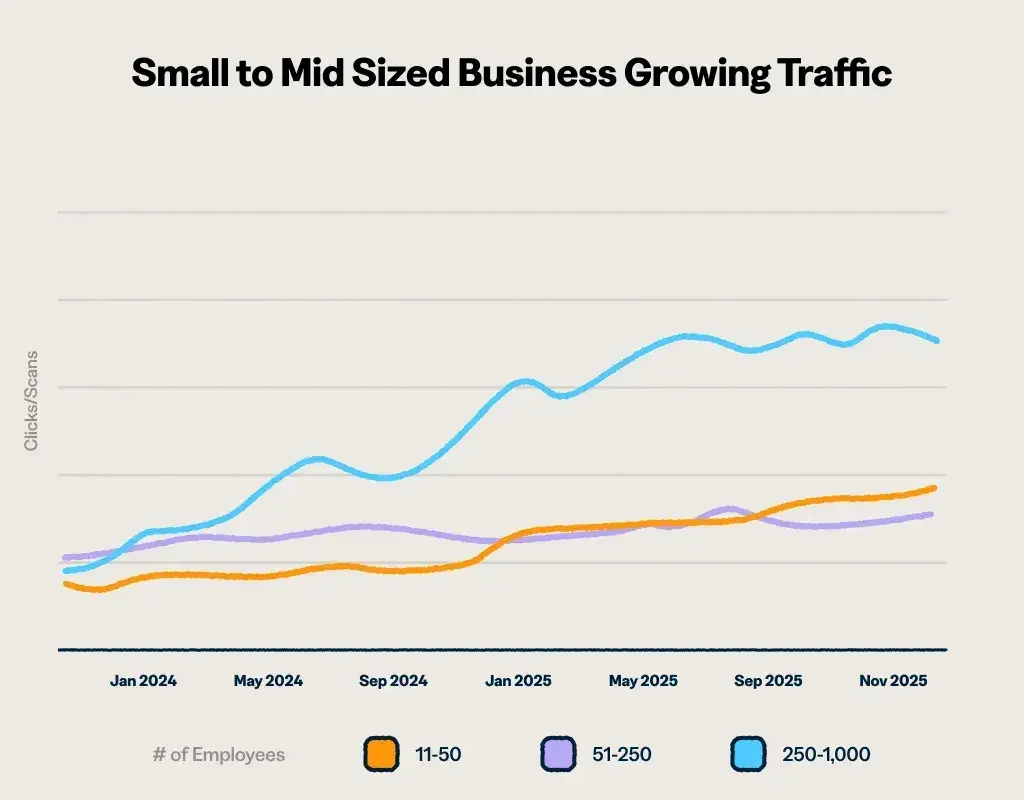
The shifts in traffic you’ve seen across your channels point to a simple takeaway: You can’t control the platforms, but you can control the clarity, trust, and consistency of the links people see before they decide to click. With the right link setup, the Bitly customers outlined in the graph above drove 10 billion more clicks than the previous year.
The performance gap between branded and standard shortened links is significant: We’ve found that custom domains get 2.3x more clicks on average.
Branded short links create that stability because they remove friction at critical moments of decision. The next section shows where they work best and how to use them in a way that turns every click into a predictable source of results.
Where to use short links for maximum results
Shortening your links isn’t only about style; it’s about turning every click into insight. URL shorteners empower you to create branded links that stand out, earn more clicks, and reveal what drives results.
Here’s how to leverage short links for maximum impact across all your channels: social media, email, SMS, and offline campaigns.
Social media
Social platforms don’t love sending people away, but that doesn’t mean your links can’t perform. The key is making them look trustworthy and worth engaging with.
Where to use short links on social
- Profile bios: Your bio is prime real estate for sharing links that move your marketing goals forward. Use a branded short link with a clear backhalf that shows exactly where it leads.
- Posts and captions: Add your link early in the caption so people don’t have to tap see more to find it.
- Stories and link stickers: Instagram and Facebook Stories let you include link stickers. A short, branded URL looks clean and professional.
- Replies and comments: When someone asks for more info, drop a short link in your reply. It takes up less real estate than a long URL, is faster than writing a long explanation, and gives you a measurable way to track clicks via Bitly Analytics.
- Ads: Paid posts benefit from the same trust signals as organic ones. A branded short link signals legitimacy and can encourage more click-throughs.
Best practices for social links
- Use a branded domain every time. Generic shorteners like bit.ly/x7f9k23 don’t tell people who’s behind the link. A branded domain like go.yourbrand.com instantly signals trust.
- Make backhalves meaningful. When it’s between /fall-sale and /a8xK2, one link’s getting clicked and the other ignored.
- Reuse links for recurring digital marketing campaigns. If you’re promoting the same landing page (like a weekly class schedule or seasonal menu), use the same short link each time.
- Pair links with action and benefit. Don’t drop a URL without context. Be specific: “Shop our fall sale and get free shipping on orders over $50: go.brand.com/fall-sale” or “Reserve your spot for tonight’s class: go.studio.com/book-class.”
- Prioritize accessibility. Check the contrast on link stickers and add alt text when possible so readers know where the link leads.
- Adjust expectations for each platform. If you use multiple social channels, consider the state of traffic for each. While our findings above show that outbound clicks on Facebook links have decreased in the last few years, this may not apply if your business primarily uses TikTok or LinkedIn.
What to avoid
- Multiple links in one post
- Random characters in your backhalf
- Hiding links at the end of long captions
Example: How a yoga studio could double link-in-bio clicks
A yoga studio in Austin used a long booking URL in its Instagram bio—something like studiobooking.com/schedule?location=downtown&class=vinyasa. It worked, but it didn’t look great. Clicks were lower than expected.
By swapping it for go.studiobrand.com/book-a-class, the studio kept the same destination but created a cleaner presentation. In this kind of case, bio link CTR may double within a month.
Actionable plays for SMB marketers
Play 1: Refresh your social bio links
Time commitment: 20–30 minutes
Objective: Make your most visible, persistent link both trustworthy and memorable.
Steps:
- Create a branded short link to your top destination (shop, booking page, donation form, or main landing page).
- Write a clear, relevant backhalf that tells people where they’re headed, like /book-massage or /shop-sale.
- Update every social bio to replace long URLs or generic shorteners with your new URL.
- Reuse this link in posts and Stories instead of creating new ones for each campaign. Consistency builds familiarity and trust.
Key performance indicators (KPIs) to track:
- Profile link CTR (clicks ÷ profile visits)
- Conversions from bio traffic
- Week-over-week performance after adding the new link
Common pitfalls:
- Using different links across platforms
- Changing your bio link too frequently
Scale it up: Once your main bio link performs well, create channel-specific backhalves to compare results. For example, use /book-ig for Instagram and /book-tiktok for TikTok to see which platform drives the most valuable traffic.
Pro tip: Branded short links let you redirect destinations without changing the visible URL. When a sale ends or campaign wraps, simply update the link to point to your next offer.
Play 2: Add branded short links to Instagram Stories or Reels
Time commitment: 30–45 minutes
Objective: Turn high-reach video content into measurable, trackable traffic.
Steps:
- Create one branded short link per promotion or offer. If you’re promoting a sale, use a relevant backhalf like /fall-sale.
- Add the link sticker near your focal visual (close to text, faces, or the main subject) so it’s easy to spot.
- Pair it with action-driven microcopy. Use short verbs like “Shop now,” “Book today,” or “Get yours” to prompt quick engagement.
- Save top-performing Stories to Highlights so new visitors can find them later and keep driving clicks.
Key performance indicators (KPIs) to track:
- Link sticker taps (Instagram Insights)
- Short link clicks (in your link management tool)
- Saves and shares as leading indicators of audience interest
Common pitfalls:
- Stickers that are too small for mobile
- Overly cluttered frames with competing graphics or text
- Dropping the same link into every Story, even when it doesn’t make sense
Scale it up: Standardize your link structure for Story Highlights. Consistency makes tracking easier over time and gives your audience a predictable destination.
Play 3: Track partner and influencer traffic
Time commitment: 60–90 minutes
Objective: Attribute referral traffic from partners and influencers without complex analytics.
Steps:
- List your active partners or influencers. Include anyone promoting your products, services, or content.
- Create a branded short link for each one using a consistent naming convention like /partner-[name] or /collab-[name].
- Add UTM parameters so you can attribute traffic and conversions more precisely. Pairing UTMs with your custom backhalves helps you see both partner-level and campaign-level performance. Learn how to use Bitly as a UTM builder.
- Distribute the links and ask partners to use them in posts, emails, or other content.
- Track clicks and conversions by partner to see who’s driving the most valuable traffic.
Key performance indicators (KPIs) to track:
- Clicks by partner
- Conversion rate by partner (purchases, signups, bookings)
- Cost per acquisition if you’re paying for placements
Common pitfalls:
- Inconsistent naming convention
- Reusing the same link across multiple partners
- Failing to set expectations for link usage or tracking
Scale it up: Fold this system into a formal affiliate or partner program. Use referral data to identify top performers and reward them with better terms, exclusive access, or higher commissions. At the same time, analyze underperforming links to refine your partnership strategy.
Pro tip: Use advanced segmentation for short links and QR Codes to compare performance by audience, content type, or campaign. It’s an easy way to see which segments drive the highest-quality traffic without needing a full analytics platform.
Email campaigns
Despite the rising volume of marketing emails consumers receive, email campaigns remain a reliable way to boost traffic: Litmus’ 2025 The State of Email report finds that 35% of companies see an ROI of 36:1 or more from email marketing. This means that every dollar spent on email marketing results in $36 in revenue. Spend one dollar, make $36. Spend $100, make $3,600.
But getting someone to open your message is only half the battle. The links inside need to look trustworthy and inspire action.
With Gmail and Yahoo’s tightening deliverability rules, branded links help your emails look professional and stay out of recipients’ spam folders.
Where to use short links in email
- Newsletters: Whether sharing blog posts or product updates, short links keep messages clean, trackable, and easy to read.
- Promotional campaigns: Sales, limited-time offers, and seasonal campaigns perform better when branded links reinforce your message and make performance easy to measure.
- Transactional emails: Short, branded URLs make these messages feel professional and genuine—not automated or robotic.
Best practices for email links
- Use a consistent branded domain. When subscribers see go.yourbrand.com in every email, they learn to trust it.
- Create unique backhalves for each call to action (CTA). If a header button and footer link both promote your fall sale, use distinct backhalves (/fall-sale-header and /fall-sale-footer) to see which placement performs better.
- Place your main CTA early. The most important link should appear near the top, before readers need to scroll.
- Write descriptive anchor text. Use clear phrases like “View our fall menu” instead of “Click here,” and ensure your links stand out visually.
What to avoid
- Generic or inconsistent shorteners
- Overloading emails with multiple CTAs
- Vague anchor text like “Learn more” or “Click here”
Example: How a nonprofit could improve donation email performance
A nonprofit sends donation emails with several CTAs: a header button, a mid-email link, and a footer reminder. Opens are strong, but CTRs lag, and the team can’t see which link drives results.
By switching to branded short links with unique backhalves—like go.nonprofit.org/donate-header, go.nonprofit.org/donate-story, and go.nonprofit.org/donate-footer—they can see exactly which placement performs best. If the mid-email link near a personal story outperforms the header button by 40%, they’ll know to lead with storytelling in future campaigns.
Actionable play for SMB marketers
Play 1: Optimize your next email send
Time commitment: 45–60 minutes
Objective: Lift CTR on your next campaign.
Steps:
- Create two branded short links with distinct backhalves, for example, /fall-sale-top and /fall-sale-bottom.
- Place your primary CTA in the top third of the email, where engagement is highest.
- Add a second CTA toward the bottom for readers who scroll through the entire message.
- Send your campaign and track which placement drives more clicks.
Key performance indicators (KPIs) to track:
- CTR by CTA placement (top vs. bottom)
- Clicks per unique recipient
- Revenue or conversions per click
Common pitfalls:
- Including too many links
- Reusing the same backhalf for multiple CTAs
- Hiding your link too far down the email
Scale it up: Build a simple workflow where every email link gets a unique backhalf before sending. If you’re already using UTM parameters for tracking, shorten those URLs so they appear clean in the email while still capturing all your analytics data behind the scenes.
Play 2: Centralize seasonal offers with one short link
Time commitment: 45 minutes
Objective: Keep your seasonal promotions consistent across all channels without creating link chaos.
Steps:
- Create one branded short link for your seasonal campaign. Use clear, relevant backhalves like /fall-sale, /holiday-menu, or /summer-special.
- Point it to your seasonal landing page, whether it’s a sale, event registration, limited menu, or campaign hub.
- Use the same link everywhere: social posts, emails, SMS blasts, QR Codes, and printed materials.
- When the offer changes, just update the destination. Redirecting the link keeps your materials live and your audience never hits a dead end.
Key performance indicators (KPIs) to track:
- Cross-channel CTR (social vs. email vs. SMS vs. offline)
- Total clicks and conversions for the campaign
- Performance across different seasonal periods
Common pitfalls:
- Creating separate links for each channel
- Forgetting to update destinations when offers expire
- Using vague backhalves like /promo or /offer
Scale it up: Reuse this framework every season. If /fall-sale performs well in October, create /winter-sale in December and /spring-sale in March. Over time, your audience will recognize the pattern, and you’ll build clean, comparable year-over-year data.
Offline
When paired with QR Codes, short URLs can even turn physical spaces into traffic drivers. Whether someone’s standing in your store, walking past your window, or sitting at a table, a well-placed QR Code can complement a short link by giving people a scannable entry point.
Where to use QR Codes and short links offline
- Menus: Restaurants, cafés, and bars can use QR Codes to connect customers to online destinations via URL to view menus, place orders, or leave reviews.
- Storefront windows and signage: A code on your window lets people browse products or book appointments, even when you’re closed.
- Receipts: Add a branded short link or QR Code to printed receipts to encourage repeat purchases, loyalty signups, or customer reviews.
- Event signage: Conferences, pop-ups, and community events benefit from QR Codes that direct attendees to schedules, vendor info, or registration pages.
- Product packaging: Include a code on packaging to share care instructions, warranty info, or to upsell related products.
- Posters and flyers: A short URL or QR Code makes it easy for people to learn more without typing a long web address.
Best practices for offline QR Codes with short links
- Show the short URL alongside the QR Code. Some people prefer typing. Displaying a branded short link gives them that option and increases scan confidence.
- Add a micro-CTA under the code. Simple phrases like “Scan to order now” or “Scan for today’s specials” remove guesswork and may increase engagement.
- Use unique backhalves for each location or campaign. If you manage multi-region campaign links or you’re using QR Codes at different events, create distinct backhalves like /menu-5th-ave or /popup-austin for better attribution.
- Size your code for real-world use. QR Codes should be at least 2 x 2 cm to scan reliably. Test them at the actual distance people will scan from.
- Ensure good contrast. Black on white works best. Avoid low-contrast color combinations that make scanning difficult.
What to avoid
- Generic QR Codes without branding or context
- Placing codes in hard-to-reach spots
- Using the same code and short link across multiple locations
Example: How a café could boost online orders with table tent QR Codes
A café recently added online ordering but saw little uptake. Customers didn’t know it was an option, and staff were too busy during rushes to mention it.
By printing branded QR Codes on table tents with the short URL go.cafebrand.com/order-coffee and a simple “Scan to skip the line” CTA, the café made online ordering visible right when customers were deciding what to get. The short URL appeared below the code for anyone who preferred typing.
Within weeks, online orders increased—especially during morning hours when customers wanted to grab their coffee quickly.
Actionable play for SMB marketers
Play: Add QR Codes at points of decision
Time commitment: 60–90 minutes
Objective: Turn offline attention into measurable digital actions.
Steps:
- Identify your highest-value decision points: places where people choose to buy, book, or engage.
- Create branded short links with location-specific backhalves. For multiple locations, use /menu-downtown or /menu-5thave. If you’re using QR Codes at events, use /expo-nyc or /launch-boston.
- Design your QR Code with context. Include your logo, the short URL in text form, and a micro-CTA like “Scan to order now” or “Scan for today’s specials.”
- Place your codes where people naturally pause. Keep them at eye level and large enough to scan easily.
Key performance indicators (KPIs) to track:
- Scans or clicks by placement (storefront, table, packaging)
- Conversions from QR Code traffic (orders, bookings, signups)
- Time-of-day and day-of-week patterns
Common pitfalls:
- Displaying a QR Code without the short URL
- Placing codes too high, too low, or out of reach
- Using one generic code for all locations
Scale it up: Pair QR Codes with promotional incentives. Add short, benefit-driven CTAs like “Scan for 10% off your first order” or “Scan to skip the line” to boost engagement rates. Track redemptions by backhalf to see what resonates. You can also use QR Codes for A/B testing—try two versions with different CTAs or placements to see which performs better.
SMS and mobile messaging
With a 98% open rate, text messages almost guarantee your audience will see what you send. But with so little space to work with, every word and every link has to earn its place. Branded short links in SMS make your message clear, trustworthy, and actionable without exceeding character limits.
Where to use short links in SMS
- Appointment confirmations and reminders: Send a text with the time, date, and a link to confirm, reschedule, or get directions.
- Flash sales and limited-time offers: When you need people to act fast, SMS gets their attention. A short link takes them straight to the offer.
- Order and fulfillment updates: Shipping confirmations, delivery notifications, and pickup reminders all benefit from a quick link to track status or view details.
- Event reminders: Whether it’s a webinar, class, or in-store event, a text reminder with a short link keeps attendance high.
Best practices for SMS links
- Keep your message concise. SMS works best with one or two short sentences plus your short link.
- Use branded short links. They save characters and build trust. A branded domain is short and immediately tells recipients who’s texting them.
- Respect opt-in rules and quiet hours. Only text people who opt in, and avoid sending messages late at night or early in the morning.
- Make your backhalf relevant. Use backhalves that match the message, like /confirm-appt, /track-order, or /flash-sale.
What to avoid
- Link-only messages with no additional context
- Long, overly detailed messages that bury the link at the end
Example: How a salon could reduce no-shows with SMS reminders
A hair salon books appointments weeks in advance, but no-shows are a recurring problem that cost time and revenue.
By switching to SMS reminders with a branded short link, the salon made confirming as easy as a tap: ”Your haircut is tomorrow at 3 p.m. Confirm or reschedule: go.salonbrand.com/confirm-appt.” The text goes out 24 hours before the appointment, giving clients a simple way to respond.
In this scenario, no-shows could drop by as much as 15% within a month.
Actionable play for SMB marketers
Play: Create short links for customer-support macros
Time commitment: 30 minutes
Objective: Resolve support issues faster and reduce back-and-forth communication.
Steps:
- Identify your top 5–10 support topics, such as return policies, setup guides, account troubleshooting, shipping info, or product documentation.
- Create branded short links for each one. Use clear backhalves like /returns, /setup-guide, /track-order, or /reset-password.
- Add these links to your email, chat, or help desk templates. Replacing long URLs keeps messages clean and consistent.
- Share the link list with your support team so everyone uses the same resources. Consistency improves speed and experience.
Key performance indicators (KPIs) to track:
- Time-to-resolution for tickets that include short links
- Deflection rate (how often a link solves the issue without follow-up)
- CTR on support links
Common pitfalls:
- Using different links for the same topics across agents
- Failing to update links when help documentation changes
- Creating overly complex or unclear backhalves
Scale it up: Review analytics regularly to see which support links get the most clicks or lead to the fastest resolutions. Use that data to prioritize updates to your help center or automate high-volume requests.
SEO discoverability content
Short links won’t directly boost your search rankings, but they may influence whether people actually click when they do find you. In search results, business profiles, and knowledge panels, presentation matters: A clean, branded link can be the difference between a click and a scroll.
Where short links help with discoverability
- Google Business Profile: A short, branded link looks more professional than a long link with tracking parameters or randomly generated character strings.
- Search result snippets: When your URL appears in search results, a readable link like go.yourbrand.com/menu is easier to digest than yourwebsite.com/locations/downtown/menu?utm_source=google&utm_campaign=fall.
- Directory listings: Sites like Yelp, TripAdvisor, and industry directories let you add a website link. A short, branded URL looks cleaner and reinforces your brand across platforms.
Best practices for discoverable links
- Use branded domains consistently. When your short links appear in search results, business profiles, and directories, using the same branded domain builds recognition.
- Make backhalves readable and relevant. A backhalf like /menu or /book-now tells people exactly where they’re going.
- Keep URLs short enough to display fully. Long URLs get truncated in search results and mobile displays. A short link ensures people see your full destination, not “yourwebsite.com/locations/downt…”
What to avoid
- Overloading links with tracking parameters
- Using generic shorteners in public-facing profiles
- Inconsistent domains across listings
Example: How a local retailer could improve local search CTR
A local bookstore has a Google Business Profile, but its website button links to a long URL: bookstore.com/home?utm_source=google&utm_medium=organic&utm_campaign=local-search.
By switching to a branded short link like go.bookstorename.com/visit, the button looks cleaner in search results and on mobile devices. The backhalf is simple and relevant, and the branded domain reinforces the store’s name.
In scenarios like this, CTR from local search results can improve by 20–30%.
Actionable play for SMB marketers
Play: Clean up your Google Business Profile links
Time commitment: 30–45 minutes
Objective: Capture high-intent local traffic with clean, trustworthy links.
Steps:
- Log in to your Google Business Profile (GBP) and open the Info section to edit your website link and action buttons.
- Create branded short links with clear backhalves. Use /visit for your main website button, /order for online ordering, or /book for appointment scheduling.
- Replace long, parameter-heavy URLs. If your current links include tracking strings or autogenerated characters, swap them for your new branded short links.
- Update other directory listings like Yelp, TripAdvisor, or industry-specific directories to use the same branded links for consistency.
Key performance indicators (KPIs) to track:
- CTR from Google Business Profile (available in GBP Insights)
- Bookings, orders, or visits from profile clicks
- Week-over-week change in profile traffic after updating your links
Common pitfalls:
- Keeping long URLs that look unprofessional and get truncated in search results
- Using generic shorteners instead of your branded domain
- Forgetting to update directory listings across platforms
Scale it up: Rotate seasonal variants of your main link. During the holidays, point /visit to a seasonal hours page; during promotions, redirect it to your sale landing page.
Pro tip: GBPs only display the root domain in website previews. If you use a generic short link (like bit.ly/custom-backhalf), it’ll appear as just bit.ly—no context or backhalf visible. Using a branded domain (like go.brand.com) keeps your business name front and center.
Your 30-day starter plan for driving more traffic
While your strategies may look different than they did five years ago, boosting traffic is still within your reach. Start small, see what works, and keep building on your wins.
Week 1: Set up your branded domain and update all social bios to include a single canonical link.
Week 2: Run one campaign, such as social Stories with a short link or an email with trackable CTAs. Add a QR Code where people make decisions, like a menu or storefront window.
Week 3: Review your link performance by channel and device. Keep investing in what delivers the strongest results.
Week 4: Expand with a seasonal landing page or partner tracking link.
As you get started, keep two things in mind:
- Low investment, high reward. Branded short links don’t require big budgets or technical expertise—just consistency.
- Trust drives clicks. When your links look professional, people are more likely to click and engage.
Pick one play to run this week, then watch your results build over 30 days. You’ll see what’s connecting with your audience and how to scale it across more channels. Get started with Bitly’s free URL shortenerand create your first branded short linkin minutes.





