
You launch a campaign, watch traffic spike, and then hit the same wall: you can see that people showed up, but not why. Which email actually contributed? Did the paid ad convert, or was it the social post you almost didn’t publish? Without clean attribution, you’re left guessing—and guessing doesn’t scale.
UTM codes can play a pivotal role here, but getting real value from UTM tracking means going beyond definitions. You also have to know how to structure, standardize, and use UTM codes across channels, including with QR Codes and offline touchpoints, where attribution often breaks down.
By the end of this guide, you’ll have a clear framework for naming and deploying UTMs consistently, as well as a practical understanding of how to read the data inside Google Analytics 4 (GA4), so you can make faster, more confident marketing decisions.
Note: The brands and examples discussed below were found during our online research for this article.
Key takeaways
- Three UTM parameters (utm_source, utm_medium, and utm_campaign) are effectively required for consistent, comparable reporting across every channel you run.
- A naming convention system with a controlled vocabulary and documented standards is what separates teams that trust their UTM data from teams that constantly question it.
- UTM codes work seamlessly with QR Codes, making it possible to bring the same measurement discipline to offline touchpoints like events, packaging, and in-store displays.
- Redirect chains, email security scanners, and unbranded short links can all affect UTM attribution integrity, and a pre-launch QA step is the most reliable way to prevent reporting gaps.
- UTMs are one of the most reliable measurement tools you control, but they have limits in a world of privacy changes and walled gardens, and understanding those limits makes your reporting more credible.
- Measurable marketing doesn’t stop at acquisition: tagging onboarding emails, renewal campaigns, and partner communications with UTMs gives you performance clarity across the full customer lifecycle.
- Bitly lets you create, manage, and track UTM-tagged short links and QR Codes in one place, so your click and scan data live in the same analytics ecosystem.
What are UTM codes?
UTM stands for Urchin Tracking Module, a name that traces back to Urchin Software, the analytics platform Google acquired to build what became Google Analytics. The history matters less than what it solves today: giving marketers a clear line of sight into which marketing campaigns, channels, and content pieces drive results.
In practical terms, UTM codes are small tags added to the end of a URL. When someone clicks that link, analytics platforms read those parameters and categorize the visit based on source, medium, or campaign.
That simple mechanism turns messy traffic into actionable insight. Rather than guessing, you gain visibility into performance and move faster on what’s working while tying efforts back to ROI. Recent industry reporting highlights how UTMs make earned media and multi-channel campaigns measurable in GA4, giving marketers reliable attribution across all their initiatives.
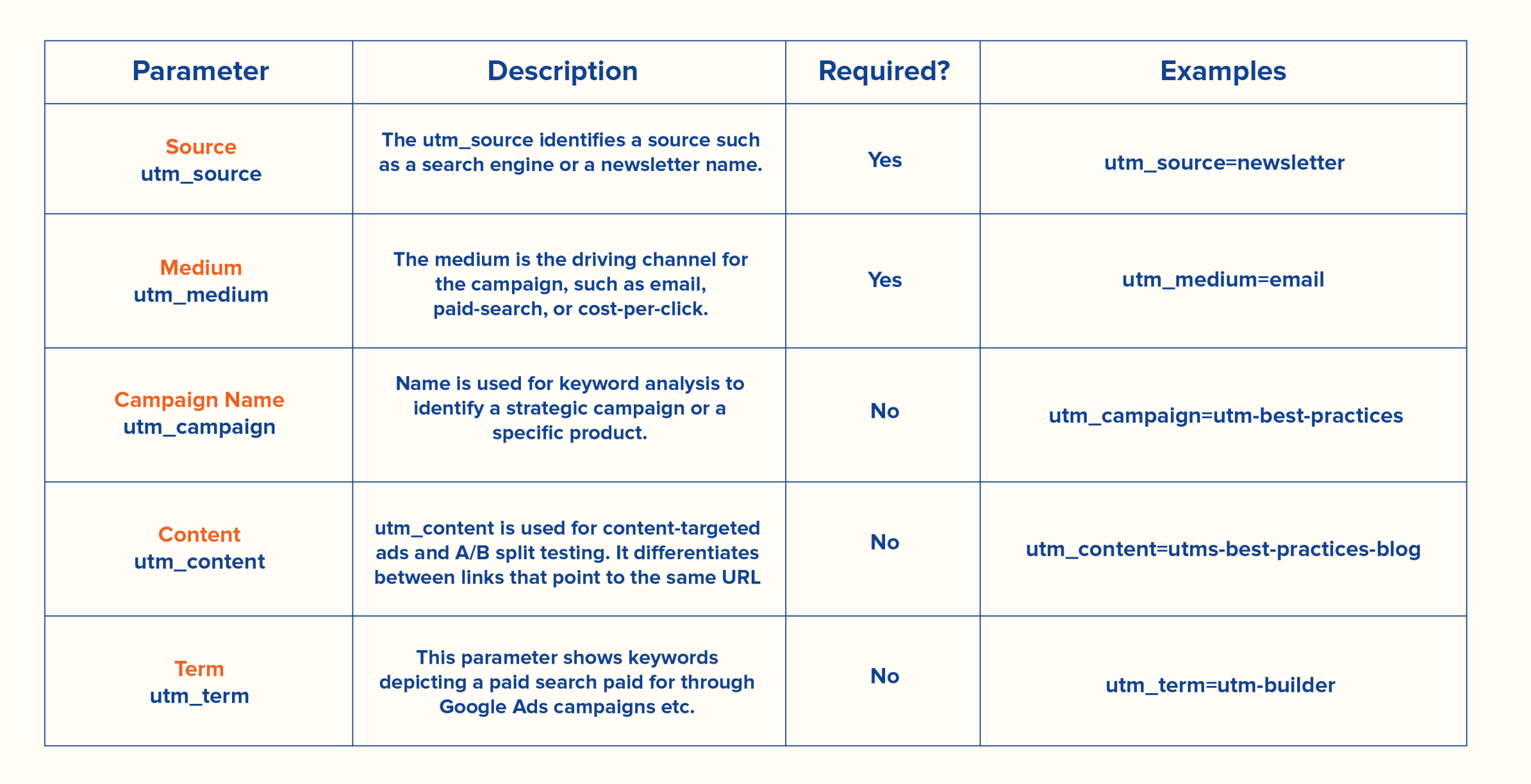
The 5 UTM parameters: What each one does and when to use it
Think of these five parameters as a shared language your entire team uses to describe where traffic comes from and why, rather than considering them a technical checklist.
Three of them do the heavy lifting and should be used consistently, so you know where traffic originated and what initiative it belongs to: utm_source, utm_medium, and utm_campaign. The other two, utm_term and utm_content, are situational and add detail when you need to differentiate keywords or variations within the same campaign.
utm_source
The utm_source parameter tells you where your traffic is coming from at the platform or property level. It answers the simple but important question: Who sent this visitor?
Common values for utm_source follow a clear, consistent pattern—think google for search traffic, linkedin for social, or newsletter for email. The key is specificity without overcomplication. You want names that clearly separate one source from another while staying standardized across campaigns.
When paired with other parameters, utm_source becomes much more powerful.
For example:
?utm_source=linkedin&utm_medium=social&utm_campaign=fall_product_launch
Now you see which platform, channel, and campaign worked together to drive traffic, rather than just seeing the traffic itself.
utm_medium
The utm_medium parameter defines how traffic reached you (marketing channel or method), rather than the specific platform. It answers the question: What kind of interaction brought this visitor here?
Good medium values stay high-level and consistent across campaigns. Common examples include email, cpc (paid search), social, and even qr for offline scans. Notice that these describe the channel category, not the tool. So you’d use “social,” not “facebook,” and email, not your ESP’s name.
Including something like utm_medium=qr is especially useful when bridging offline and online efforts. It sets you up to track scans from print materials, signage, or packaging with the same clarity as digital clicks.
Used alongside source and campaign, medium helps turn scattered traffic into a clean, organized story.
utm_campaign
The utm_campaign parameter is where you name the actual initiative you’re trying to measure, whether that’s a promotion, product launch, or broader marketing push. It ties all your links back to a single effort, so you can evaluate performance at the campaign level.
It’s a must-use parameter for consistent reporting. The name should be clear and specific enough to stand out in a dashboard filled with overlapping campaigns. A pattern like spring-sale-2025 or q2-brand-awareness keeps things readable, while still giving you enough detail to sort and compare.
Here’s how it looks in practice:
?utm_source=google&utm_medium=cpc&utm_campaign=spring-sale-2025
With a strong naming convention, utm_campaign becomes the anchor that keeps your reporting organized as you scale.
utm_term
The utm_term parameter is mainly used for paid search campaigns to capture the specific keyword or phrase that triggered your ad. It answers the question: Which search term brought this visitor to your site?
Unlike source, medium, and campaign UTMs, utm_term is situational. For organic social posts, emails, or QR Codes, it can add unnecessary complexity. Use it when you want granular insight into keyword-level performance in paid search campaigns, but skip it when the detail isn’t relevant.
For example, a paid search link might look like this:
?utm_source=google&utm_medium+cpc&utm_campaign=spring-sale-2025&utm_term=running-shoes
By tagging keywords, utm_term lets you tie clicks and conversions directly back to the exact search terms driving ROI, helping refine bids and ad targeting over time.
utm_content
The utm_content parameter helps you differentiate between multiple links within the same campaign. It’s most useful for A/B testing when you want to track different ad creatives, email placements, or call-to-action buttons. It answers the question: Which version of the link actually drove the click?
Like utm_term, utm_content is situational. Only use it when you have a plan to act on the data. Adding parameters without intention creates clutter in your reports and fails to deliver meaningful insight.
For example, if you’re testing two email CTAs, your links might look like this:
?utm_source=newsletter&utm_medium=email&utm_campaign=spring-sale-2025&utm_content=cta-blue
and
?utm_source=newsletter&utm_medium=email&utm_campaign=spring-sale-2025&utm_content=cta-green
This way, you can see which version performed best and make decisions with confidence.
How to create UTM codes: A tool-agnostic workflow
Creating a UTM code starts with Google’s Campaign URL Builder or a similar tool. You enter the destination URL and fill in fields that map directly to the five UTM parameters:
- Website URL: The page you want visitors to land on
- Campaign Source: Maps to utm_source, showing where traffic is coming from (like Google, LinkedIn, or newsletter)
- Campaign Medium: Maps to utm_medium, defining the channel type (email, social, cpc, qr)
- Campaign Name: Maps to utm_campaign, identifying the marketing initiative or promotion
- Campaign Term: Maps to utm_term, used for paid search keywords (optional)
- Campaign Content: Maps to utm_content, distinguishing link variants or creative versions (optional)
For example, a finished URL might look like this:
https://example.com/product-page?utm_source=linkedin&utm_medium=social&utm_campaign=spring-sale-2025&utm_content=cta-blue
One link is easy, but when you’re managing dozens or hundreds across teams, campaigns, and channels, a systematic workflow becomes a must. That need for structure naturally leads to naming conventions and governance.
UTM naming conventions that scale: Building a shared language for your team
Attribution issues tend to come from inconsistent UTMs, not missing ones. Fixing this involves creating a shared system your team can stick to as campaigns and contributors scale.
Why consistency is the whole game
Inconsistent UTM naming prevents you from comparing performance. If one team member tags traffic as “linked” and another uses “li” or “linked_ads,” those visits are split across multiple buckets. What should be a single, clear signal turns into fragmented data.
You might see traffic coming in, but you can’t confidently measure which channels or campaigns are actually driving results.
A consistent naming system fixes that at the source. Rather than being red tape, it’s what makes your attribution data trustworthy. When everyone follows the same structure, you can quickly see what’s performing and shift your budget as needed.
Building your naming system
A workable naming system doesn’t have to be complex, but it does need to be consistent. Build it around a few clear rules your team can follow:
- Define a channel taxonomy for utm_source (google, partner site, instagram).
- Standardize your utm_medium values (email, qr, pcp, social).
- Create a campaign naming formula like [quarter]-[initiative]-[audience].
- Set formatting rules—use lowercase only and hyphens instead of spaces.
To keep everything aligned, document your links in a shared tracker with essential fields, such as:
- Campaign name
- Destination URL
- Full UTM string
- Owner
- Launch date
- Status
Before anything goes live, add a QA check. One pass to confirm naming, formatting, and links can prevent broken URLs, duplicate campaign names, misattributed traffic, and inconsistent analytics that slow down decision-making.
Governing naming conventions across teams
In multi-team environments, someone needs to own the naming taxonomy—usually a marketing operations or analytics lead. They’re the point person for approving new utm_source or utm_medium values and ensuring everyone follows the agreed structure.
Requests to add new values should go through a simple approval process so teams don’t start creating ad-hoc terms that fragment your data.
Plan on regular audits to catch drift early. Even a quick quarterly review can help you identify issues, like inconsistent campaign names or formatting slips before they become a reporting problem.
Channel-specific UTM strategies: Email, social, paid, and partners
Email campaigns should use utm_medium=email and a source that clearly identifies the newsletter, series, or sending team. Consistent naming makes it easy to see which emails drive clicks and conversions—a core part of direct response marketing.
Example: ?utm_source=spring-newsletter&utm_medium=email&utm_campaign=spring-sale-2025
Decision rule: Standardize utm_source to reflect the sending list or newsletter, and always use utm_medium=email
Social requires a distinction: organic posts use utm_medium=social, while paid campaigns should use utm_medium=cpc or utm_medium=paid-social. Social media also uses QR Codes to track scans across offline channels. Confusing the two will mix organic and paid performance, corrupting channel-level reporting,
Example (organic):
?utm_source=linkedin&utm_medium=social&utm_campaign=spring-sale-2025
Decision rule: Always tag the platform as utm_source and select medium based on whether the post is paid or organic.
Paid search links need utm_medium=cpc and the search engine as the source. Including utm_term for keywords adds granularity and helps optimize bids and copy.
Example:
?utm_source=bing&utm_medium=cpc&utm_campaign=spring-sale-2025&utm_term=running-shoes
Decision rule: Standardize utm_source by search engine and utm_medium=cpc, and add only utm_term for paid search campaigns.
Partner or affiliate links should identify the partner in utm_source and use utm_medium-referral. This prevents multiple affiliates from being lumped together and ensures you can accurately measure performance.
Example:
?utm_source=partnerxyz&utm_medium=referral&utm_campaign=spring-sale-2025
Decision rule: Always use the partner’s name for utm_source and referral for utm_medium to maintain consistent attribution across affiliates.
QR Code UTMs and offline-to-online tracking
UTMs are not just for digital campaigns
UTM tracking isn’t limited to clicks on websites or emails. QR Codes can carry UTM-tagged URLs, turning traditionally “offline” touchpoints, like event signage, product packaging, direct mail, or in-store displays, into measurable campaigns.
Dynamic QR Codes make this even more powerful, allowing you to track the same codes across Bitly and Google Analytics. Embedding UTMs in scannable links means teams can update destination URLs in real time without reprinting materials, keeping attribution intact and making offline campaigns as agile as digital ones.
Building an offline UTM taxonomy
Offline campaigns can be just as trackable as digital ones when set up properly. Use utm_medium=qr for every QR Code and set utm_source to describe where it lives (event-booth, product-packaging, direct-mail-q3).
These campaigns follow the same naming conventions as digital campaigns: lowercase letters, hyphens instead of spaces, and a clear structure for source/medium/campaign. Treat offline UTMs the same way, and your QR Code scans fit neatly into the same reporting framework, supporting omnichannel marketing.
A few examples include:
- Event signage: ?utm_source=event-booth&utm_medium=qr&utm_campaign=fall-launch
- Packaging insert: ?utm_source=product-packaging&utm_medium=qr&utm_campaign=holiday-promo
- Direct mail: ?utm_source=direct-mail-q3&utm_medium=qr&utm_campaign=summer-sale
Even nonprofits use QR Codes this way, pairing them with UTMs to see how print and in-person touches drive traffic and engagement.
UTM data quality: Common pitfalls and how to prevent them
Even well-structured UTM systems can break down in execution. A few small gaps are all it takes to turn clean attribution into unreliable data, so it’s worth building in simple safeguards upfront.
- Pitfall: Inconsistent capitalization. “Facebook” vs. “facebook” is treated as separate sources in GA4.
Prevention: Enforce lowercase-only formatting across all parameters. - Pitfall: Tagging internal links. UTMs on internal navigation overwrite original source data and inflate campaign sessions.
Prevention: Only use UTMs for incoming traffic, never for links within your own site.
- Pitfall: Duplicate parameters. Stacked or repeated UTM strings create conflicting data.
Prevention: Generate links from a single source of truth and avoid manual copy/paste edits. - Pitfall: Missing required parameters. Links without source, medium, or campaign data can’t be categorized properly.
Prevention: Require all three core parameters before any link goes live.
- Pitfall: Skipping QA checks. Broken links or misnamed parameters slip into active campaigns.
Prevention: Add a pre-launch review step to validate structure, naming, and functionality.
Redirects, short links, and attribution integrity: What marketers need to know
UTM tracking doesn’t happen in a vacuum. Once links are shortened, redirected, or scanned by security tools, new variables enter the mix, and they can affect how your data is recorded. Understanding how these layers interact with your UTM parameters helps you preserve attribution accuracy.
Does shortening a UTM link break tracking?
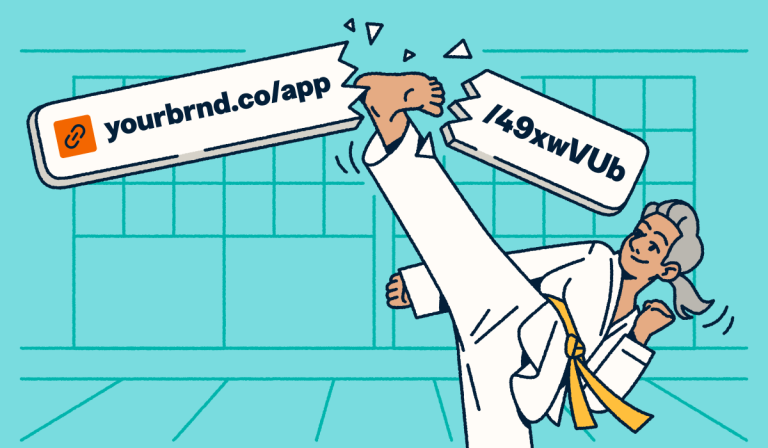
Short answer: no. If everything is set up correctly, shortening a link won’t break your tracking. A properly configured short link redirects to your full URL, preserving the UTM parameters so attribution stays intact.
Where things go wrong is usually upstream:
- If you shorten a link that’s already missing parameters, the problem is locked in and harder to spot later.
- Redirect chains that strip query strings can potentially remove your UTMs before the visit is recorded.
You can prevent both with a quick pre-launch check. Make sure the full URL includes all required parameters before shortening and test the final link to confirm the UTMs persist through the redirect.
Email security scanners and click inflation
Some corporate security tools automatically “click” links before the recipient ever sees the message. These scans check for malicious content, but they can show up as real clicks in your reports, inflating engagement and muddying your UTM data.
This isn’t rare. It’s a known pattern, especially with B2B audiences. You might notice clicks with no corresponding sessions or unusually fast activity right after send.
The best approach is to treat this as noise you can reduce, not eliminate. Filtering known bot traffic in GA4 and watching for suspicious patterns can help you get closer to true engagement, even if the data isn’t perfectly clean.
Where to find UTM data in GA4 (and what to look at first)
Once your links are live, GA4 is where you confirm that everything is working as expected. Start in Traffic Acquisition (Reports→Acquisition). This report shows session-level data, making it the quickest way to validate that your UTMs are coming through cleanly.
Begin with Session source/medium, and look for your expected values, making sure they’re consistent and aligned with your naming conventions. If something looks off, it usually indicates a tagging issue.
To evaluate campaigns, switch the primary dimension to Session campaign. This lets you ensure campaign names are populating correctly and compare how different initiatives are performing over time.
For deeper insights, use utm_content to compare creative variations and utm_term to assess keyword-level performance in paid search.
What UTMs can and cannot solve in modern attribution
UTMs are one of the most reliable tools marketers can control, but they operate within certain limits. Understanding these can help you interpret the data realistically for informed decision-making.
- Privacy and browser restrictions. Some browsers and privacy settings can suppress or strip UTM data. Marketers are increasingly relying on structured tagging and first-party signals to retain visibility as third-party cookies wane.
Decision rule: Treat UTM results as directional insights rather than a complete picture of performance.
- Walled gardens (Meta, LinkedIn, Google). Platform-reported attribution can differ from what appears in GA4.
Decision rule: Use UTMs to compare trends and patterns, not to reconcile exact numbers across systems.
- Dark social and direct traffic. Links copied outside tracked environments may lose attribution.
Decision rule: Expect some traffic to appear as direct and consider it when analyzing results.
- GA4’s session-based model. Multi-touch journeys are handled differently from how they are in Universal Analytics.
Decision rule: Use UTMs as one input alongside other reporting sources to guide decisions, without assuming perfect accuracy.
UTMs beyond acquisition: Lifecycle, retention, and customer communications
UTM tracking isn’t just for new leads. The same discipline that helps you understand acquisition campaigns can be applied across the entire customer lifecycle, giving visibility into how every touchpoint performs.
Onboarding email sequences:
?utm_source=onboarding-email&utm_medium=email&utm_campaign=welcome-series
Renewal or upsell campaigns:
?utm_source=renewal-email&utm_medium=email&utm_campaign=q2-upsell
Partner co-marketing emails:
?utm_source=partnerxyz&utm_medium=email&utm_campaign=joint-promo
Webinar follow-ups:
?utm_source=webinar&utm_medium=email&utm_campaign=post-event
In-app messages linking externally:
?utm_source=in-app&utm_medium=messaging&utm_campaign=resource-share
Bitly supports businesses that manage ongoing digital communications, not just new-lead campaigns. Using UTMs at every stage provides the same performance clarity teams expect from paid campaigns. Pairing this with personalized URLs allows for segmented outreach and even clearer downstream analytics, making lifecycle reporting actionable.
How Bitly supports your UTM strategy from creation to analytics
Bitly acts as the operational layer that makes UTM workflows repeatable and scalable across campaigns.
For creation, you can generate UTM-tagged short URLs with customizable branding or AI-generated custom domains, keeping links trackable and brand-consistent.
For management, scalable link management and Bitly Campaigns organize multiple UTMs in a single view, ensuring naming conventions and attributions remain reliable.
For tracking and reporting, Bitly Analytics surfaces click and engagement data, while the unified click-and-scan measurement lets teams see QR Code scans and link clicks in the same ecosystem.
Dynamic QR Codes extend this workflow offline, letting you tie signage, packaging, or direct mail back to the same UTM-driven reporting framework, ensuring both digital and physical touchpoints contribute to performance insights without adding complexity.
Move from UTM strategy into action with Bitly
You’ve built the framework: clean UTM naming, governance, channel-specific strategies, and lifecycle tracking. The next step is putting it into practice in a way that scales.
Bitly brings that workflow together, letting you create UTM-tagged short links, manage Dynamic QR Codes, and see clicks and scans side by side in analytics tools. Everything lives in one platform, so your attribution is organized and repeatable.
With this system in place, it’s easier to turn strategy into results and make confident decisions across campaigns and touchpoints.
Simple UTM tracking with enterprise-level visibility: Get started with Bitly today!
FAQS
Do UTM parameters affect SEO or hurt my search rankings?
UTM parameters do not negatively affect your search rankings when your site uses canonical tags correctly. Search engines read the canonical URL, not the UTM-tagged version, so your page authority stays intact. The one place to be careful is internal links: never add UTM parameters to links between pages on your own site. When you tag internal links, analytics platforms count each tagged click as a new session from a campaign source, inflating your campaign traffic numbers and making it nearly impossible to accurately measure how visitors actually navigate your site. Reserve UTM tags exclusively for external-facing campaign links.
What is the difference between utm_source and utm_medium?
Think of utm_source as the “who” and utm_medium as the “how.” The source identifies the specific platform or property sending traffic to your site, such as Google, Mailchimp, or LinkedIn. The medium identifies the channel type or marketing method, like email, cpc, or social. For example, a paid LinkedIn ad would use utm_source=linkedin and utm_medium=cpc, while a LinkedIn newsletter post would use utm_source=linkedin and utm_medium=social. Keeping this distinction consistent across your team is what makes channel-level reporting in GA4 reliable and comparable over time.
Can I use UTM codes with QR Codes?
UTM parameters work seamlessly with QR Codes because the QR Code simply encodes the destination URL, UTMs included. Those parameters pass through to GA4 when someone scans it. The recommended approach is to use utm_medium=qr as your standard medium value for all QR Code campaigns, then use utm_source to identify the specific physical placement, like event-booth, product-packaging, or direct-mail-q3. This gives you clean offline-to-online attribution in the same GA4 reports where you track your digital campaigns. Bitly’s Dynamic QR Codes let you update the destination URL after printing without changing the QR Code itself, so your UTM structure stays intact even when campaign details change.
Does shortening a UTM link break the tracking?
A properly configured link shortener preserves UTM parameters through the redirect, so your tracking stays intact as long as the destination URL was correctly formed before shortening. The two scenarios where attribution can break are shortening a link that was already missing parameters and redirect chains that strip query strings before the final destination is reached. Both are preventable with a simple pre-launch check: paste your shortened link into a browser and confirm the full UTM-tagged destination URL appears in the address bar after the redirect resolves.
How many UTM parameters do I actually need to use?
Every campaign link should include at minimum utm_source, utm_medium, and utm_campaign. These three parameters give you the channel-level and campaign-level visibility needed for consistent, comparable reporting across everything you run. Add utm_term when you’re running paid search campaigns and want to track keyword-level performance. Add utm_content when you’re testing multiple creative variants or link placements within the same campaign and have a plan to act on the differentiated data. If you’re not sure you’ll use the data from utm_term or utm_content, leave them out. Unused parameters add complexity to your naming system without adding insight to your reports.